A fake one-star review usually shows up at the worst time. You’re already juggling customers, staff, scheduling, and cash flow, then Google alerts you that someone you don’t recognize has posted a damaging complaint on your Business Profile. The first reaction is usually anger. The second is confusion, because the review often sounds confident enough to look real to everyone else.
That reaction makes sense. Fake Google reviews surged 62% globally from 2020 to 2023, and 88% of consumers trust online reviews as much as personal recommendations, according to Kook. The same source notes that a single fake 1-star review can cut conversions by as much as 20%. For a local business in Central Florida, that can mean fewer calls, fewer direction requests, and fewer booked jobs.
The good news is that this problem is manageable if you stop treating it like a personal insult and start treating it like a platform enforcement issue. Google doesn’t remove reviews because a business dislikes them. Google removes reviews when the business presents a clear policy violation and supports it with evidence.
That’s the mindset shift that matters. Don’t argue. Document. Don’t panic. Build a case. If the review is part of a scam, keep an eye on broader warning signs too, including patterns covered in this update on online scammer tactics affecting businesses.
Table of Contents
- That Sinking Feeling When a Fake Review Appears
- Building Your Case Before You Report
- The Official Google Review Reporting Process
- Responding Publicly While You Wait
- When Google Says No Advanced Escalation Tactics
- Build a Fortress Around Your Online Reputation
That Sinking Feeling When a Fake Review Appears
A fake review hits harder when you know your team didn’t earn it. Maybe the reviewer name isn’t in your CRM. Maybe the complaint describes a service you don’t even offer. Maybe three similar one-star posts land in a short window and all sound like they were written by the same person.
That’s when owners often make their first mistake. They respond emotionally, or they report the review with no documentation and hope Google figures it out. Usually, that doesn’t work.
Spot the red flags first
Before you touch the report button, check whether the review shows obvious signs of manipulation:
- No matching customer record: Search your CRM, booking software, invoices, emails, and call logs.
- Generic language: Vague lines like “terrible service” without any actual detail are common in fake submissions.
- Thin reviewer profile: Empty history, no meaningful review trail, or an account that only leaves harsh ratings.
- Pattern behavior: Similar wording, same complaints repeated across profiles, or several negative reviews arriving close together.
Practical rule: If you can’t explain exactly why the review violates policy, Google probably won’t remove it.
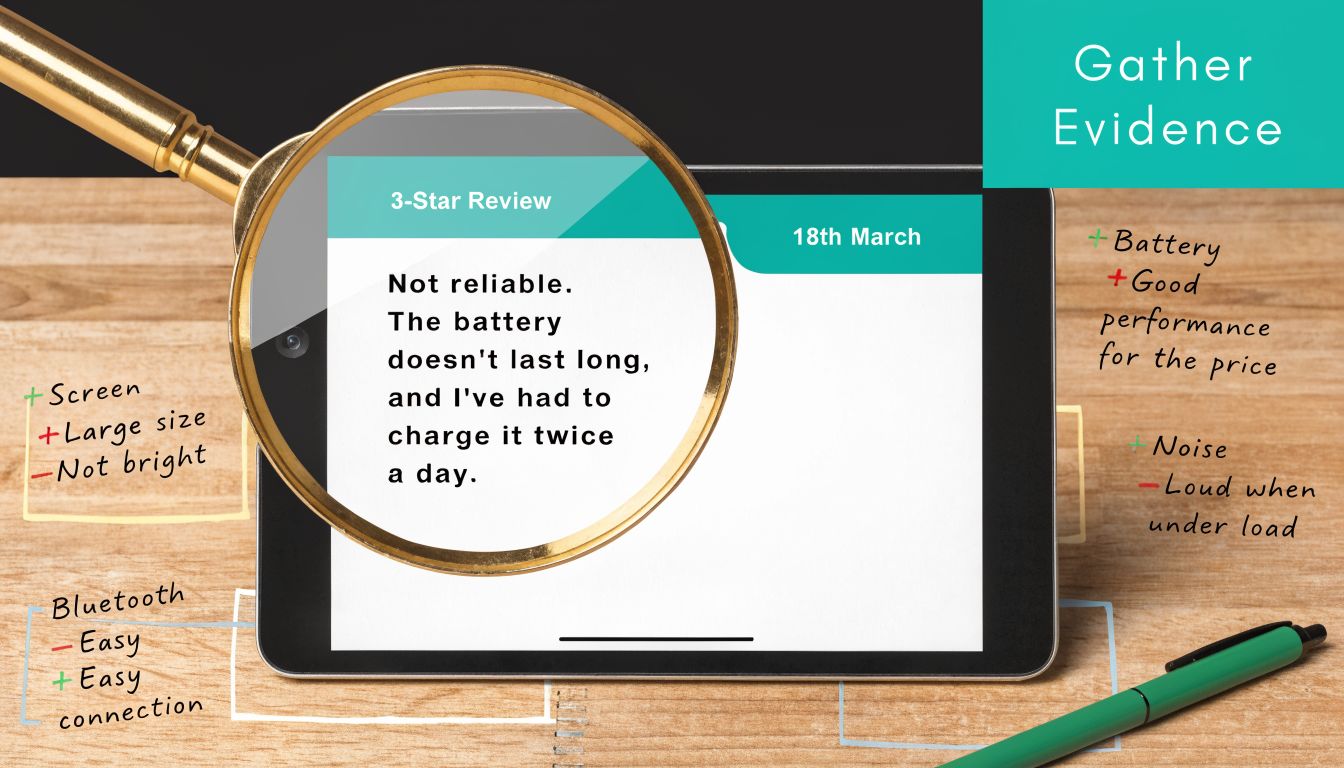
Document evidence like a moderator would
Your job is to make the case easy to understand. Think like a reviewer on Google’s moderation team who has never heard of your company and only sees your evidence for a few minutes.
Build a simple evidence folder with:
- Screenshots of the review
- Screenshots of the reviewer profile
- A note showing your internal record search
- Any pattern evidence, such as repeated phrasing across multiple reviews
A business owner who understands how to report fake google reviews well usually isn’t the one who clicks faster. It’s the one who documents better.
Building Your Case Before You Report
A weak report says, “This review is fake.” A strong report shows why. That difference matters.
Google’s process is built around policy categories, not your frustration. If you choose the wrong category or submit without evidence, you make the moderator do all the interpretive work. Most owners lose the case right there.
Spot the red flags first
Use this quick screening table before you file anything:
| Signal | What to check | Why it matters |
|---|---|---|
| Reviewer identity | Name doesn’t appear in your systems | Suggests no real transaction or service history |
| Review specificity | No dates, no staff names, no service detail | Weakens the claim of a real customer experience |
| Profile quality | Sparse activity or suspicious history | Can point to fake engagement |
| Timing | Multiple negatives appear close together | Suggests a coordinated attempt |
If you handle customer data while verifying whether someone was real, follow your own privacy standards. That includes keeping internal proof organized and secure, which is part of broader data protection best practices.
Document evidence like a moderator would
When you gather proof, keep it clean and factual. Don’t write a long emotional narrative. Use plain notes such as:
- Reviewed CRM: No customer match found
- Checked appointment log: No matching booking
- Checked payment history: No transaction under reviewer name
- Captured reviewer profile: No credible activity tied to a real service interaction
A good report doesn’t ask Google to trust your opinion. It gives Google a reason to enforce its own rules.
If you’re dealing with one suspicious review, this prep still helps. If you’re dealing with a cluster, it becomes essential because pattern evidence is often stronger than arguing about one post in isolation.
The Official Google Review Reporting Process
Start with Google’s native reporting path because it creates the case history you may need later if the first review report is denied. That first submission matters. It tells Google which policy you believe was violated, and it sets the baseline for any escalation that follows.
Report from the business side first
If you manage the listing, submit the report from your verified Google Business Profile account instead of asking staff or friends to flag it as public users. Owner-level reports carry clearer context, and they give you a cleaner paper trail if you later need support to review a denial.
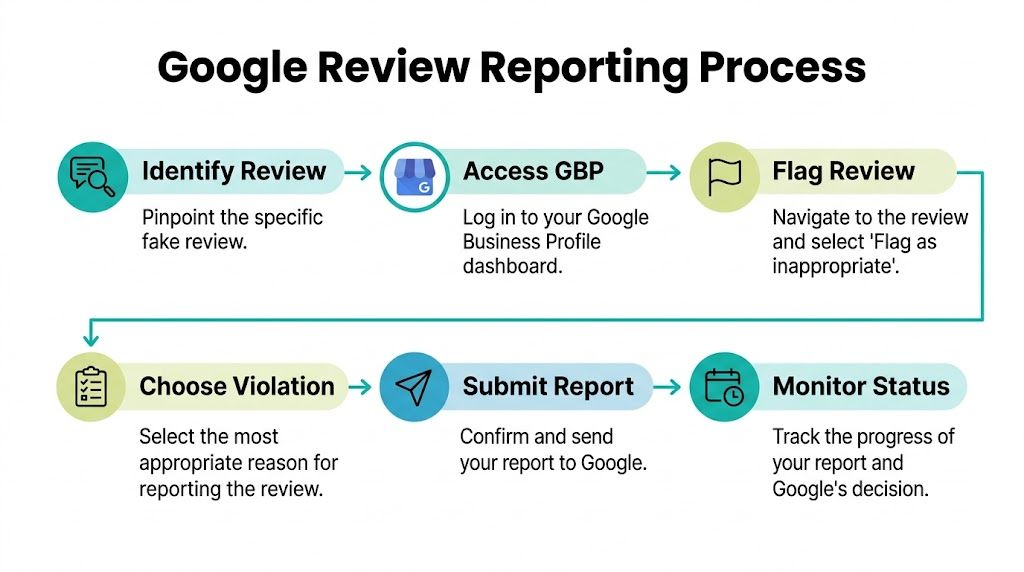
Use the Google Business Profile dashboard and work methodically:
- Sign in to the account that manages the profile
- Select the correct location if you oversee more than one business
- Open the Reviews section
- Find the suspicious review
- Click the three-dot menu
- Choose Report review
- Select the closest policy violation
- Submit and monitor the status through Google’s review management workflow if it is available in your account
Google documents the reporting options in its reviews management tools documentation.
If you want a useful companion read on what Google does and doesn’t let businesses control directly, Can I Delete Google Reviews? gives a helpful overview.
Pick the category Google can actually enforce
A weak category is one of the main reasons valid reports stall. Google is not judging whether the review feels unfair. It is checking whether the content appears to violate a specific policy.
Choose the narrowest match:
- Spam for repetitive, mass-posted, or obviously fabricated reviews
- Fake engagement for purchased reviews, coordinated posting, or suspicious account manipulation
- Off-topic for content unrelated to an actual experience with the business
- Restricted or illegal content for threats, hateful content, explicit material, or other prohibited content
I tell clients to resist the urge to throw every accusation at the form. A focused report usually performs better than a broad one. If the review is fake, say why it appears fake. If it is part of an attack, build that case later through escalation with pattern evidence across multiple reviews.
Treat the first report as step one, not the whole strategy
Many business owners assume the flag button is the process. It is only the opening move.
Google’s first pass is often limited, especially if the review is written in vague language and does not contain obvious profanity, threats, or spam signals. That is why accuracy matters on the initial submission. You are giving Google the cleanest possible reason to remove the review now, while also preparing for the more detailed escalation work covered later in this article.
For businesses that depend on local discovery, review problems can affect click-through rate, trust, and conversions tied to your broader local SEO strategy.
A quick walkthrough helps if you want to see the basic interface in action:
Keep your submission short and specific
Google’s built-in form does not reward long explanations. It rewards clarity.
State the issue in plain terms that match the category you selected. For example, if no record of the customer exists, say the review cannot be tied to any customer, appointment, order, or service record you maintain. If several reviews arrived at once, note that you are seeing a pattern and keep your internal documentation ready in case the first decision comes back against you.
The goal here is simple. Give Google a policy reason to act now, then preserve enough structure to push the case further if the answer is no.
Responding Publicly While You Wait
The public response is damage control, but it’s also brand positioning. People read how you handle pressure. They often care as much about your tone as they do about the complaint itself.
If your review report is pending, silence can read like avoidance. A short, professional reply usually works better than pretending the review isn’t there.

What a strong reply does for your brand
A strong reply should be firm without sounding defensive. It should invite a real customer to continue the conversation privately, while subtly indicating that you question the review’s legitimacy.
That balance matters. If you sound combative, prospects may assume the reviewer struck a nerve. If you sound passive, prospects may assume the complaint is true.
Good public responses usually include:
- Recognition of the feedback
- A factual note that no matching record was found
- An invitation to contact the business directly
- A calm, professional tone
The writing matters here. Word choice can lower the temperature or raise it. That’s why businesses that care about brand trust often treat review responses as part of their broader copywriting and messaging strategy.
Reply templates you can adapt
Use one of these as a starting point.
We take reviews seriously and have checked our records carefully. At this time, we can’t identify a customer interaction that matches this account. Please contact us directly so we can investigate further.
If the review contains vague accusations:
We’re committed to resolving legitimate concerns, but this review doesn’t include details that let us verify the experience. Please reach out privately with your name, date of service, and contact information.
If you suspect coordinated spam:
We’re currently reviewing this post through Google’s reporting process because we can’t match it to a verified customer interaction. If this concerns a genuine experience, please contact our team directly.
These replies are short on purpose. They aren’t legal briefs. They’re public trust signals.
When Google Says No Advanced Escalation Tactics
Most online guides stop here. They tell you to click the flag icon and wait. If Google denies the report, you’re left thinking the review must be permanent. It isn’t always.
A denied first report usually means one of two things. Either the wrong violation category was used, or the evidence wasn’t strong enough for the first-line review process. That’s when escalation matters.

Appeal once and make it count
If your first report is rejected, file one appeal and attach the best evidence you have. Don’t repeat the same vague claim. Make the next submission tighter and more specific.
Include:
- Business name
- Business Profile or Maps URL
- Review URL
- Reviewer profile link if available
- A concise explanation of the policy violation
- Screenshots and internal verification notes
Keep it factual. “We dislike this review” isn’t useful. “We checked our booking logs, payment records, and CRM, and found no matching customer history under this name” is useful.
Field note: The appeal should read like a case summary, not a rant.
Use the redressal path for coordinated attacks
If several suspicious reviews appear together, don’t treat them like unrelated incidents. A cluster often deserves a broader complaint path, especially if the timing and language suggest coordination.
For attack patterns, business owners can use the Business Redressal Complaint Form rather than relying only on one-by-one flags. This is the better route when multiple fake profiles hit your listing in a short burst.
That’s especially relevant for service businesses, law firms, and high-ticket local brands where one review wave can distort lead quality. Firms that also manage paid lead platforms may already understand the value of formal dispute workflows, similar to processes used in LSA bad lead dispute management.
Handle extortion differently
Some fake reviews aren’t random. They’re a tactic.
Google provides a dedicated form for review extortion, where someone threatens a negative review or offers to remove one in exchange for payment, as explained in Google’s extortion reporting guidance. The same source notes that FTC reports show a rise in these scams, while a 2025 Local Search Association survey found only 20% of small businesses know this tool exists.
If money, favors, discounts, or any other exchange is being demanded, stop treating it like a normal fake review case. Save every message, screenshot every threat, and use the extortion form.
Businesses in regulated fields should also think beyond platform reporting. If the false content creates legal exposure, counsel may need better systems for documentation and evidence review. For firms evaluating those workflows, it can help to explore the best legal tech tools that support organized case handling.
Use ethical strength in numbers
If a review is clearly fake, ask trusted non-conflicted people who can accurately identify the issue to report it through Google Maps or Search. This is not the same as asking for fake engagement. It’s coordinated reporting of a suspected policy violation.
That tactic works best when the reports come from real accounts and the review appears abusive, fabricated, or spammy. It gives Google more consensus signals than a single owner complaint alone.
This approach is often the difference between “nothing happened” and “the case got human attention.”
Build a Fortress Around Your Online Reputation
A fake review hurts most when it lands on a thin profile.
If you have only a handful of reviews, one fabricated one-star post can distort how prospects judge the business. If you have a steady pattern of recent, legitimate feedback, the same attack usually loses force. That is the practical goal here. Build enough trust signals that a bad actor cannot easily redefine your reputation in public.
Why proactive review management matters
Your Google Business Profile affects far more than public perception. It shapes whether a searcher clicks, calls, or keeps scrolling. I have seen businesses spend heavily on SEO, ads, and web design, then lose the lead at the trust-check stage because the review profile looked neglected or erratic.
That is also why this section matters after a failed report. If Google leaves a false review live, your recovery options are stronger when the rest of the profile clearly reflects real customer experience. A healthy review pattern gives you context, credibility, and more resilience while you work through appeals or a broader spam attack.
What to put in place now
Keep the system simple, but run it consistently.
- Ask for reviews at the right moment: Request feedback soon after a completed service or successful purchase, while the experience is still fresh.
- Use a repeatable ask process: Train staff on who asks, when they ask, and how they ask, so review growth does not depend on memory or luck.
- Watch your profile on a schedule: Check for new reviews often enough to catch suspicious activity before it sits for weeks.
- Respond to legitimate reviews: Thank happy customers and address real complaints calmly. An active profile signals that the business is paying attention.
- Save evidence immediately: Screenshot suspicious reviews, account names, timing patterns, and any related messages. Delays make escalation harder.
- Track failed reports: If Google rejects a valid complaint, log the date, the policy issue involved, and what you submitted. That record helps when you need to escalate with a cleaner case file.
This is not about gaming reviews. It is about reducing your exposure. Businesses that collect honest feedback steadily, monitor consistently, and document problems early are in a much better position when the first flag does nothing.
Owners can build this process in-house. That is often enough for routine review management. Once fake reviews start affecting rankings, lead quality, staff morale, or revenue, outside help becomes a business decision based on cost of delay.
If your business needs a stronger system for review defense, local SEO, conversion-focused web strategy, or full-funnel digital growth, Emulous Media Inc can help. We work with Central Florida businesses and growing brands that need more than generic marketing advice. To talk through your situation, book a free consultation, call 689-255-6327, or visit the contact page on our website.