You’re probably already doing the work AI is supposed to help with. You answer inquiries after hours, rewrite the same service descriptions, tweak ad copy, post on social media when you remember, and try to keep your website visible in search. Most small business owners in Central Florida don’t need more marketing theory. They need a practical system that saves time and drives leads.
That’s where ai marketing for small business stops being a buzzword and starts becoming useful. The right way to adopt it isn’t to buy five tools at once or let software run your brand unchecked. It’s to build in phases. Start with the tasks that are repetitive and easy to improve. Then automate the workflows that affect lead flow. Then connect your data so you can see what’s producing revenue.
A smart 90-day rollout does exactly that. It gives local service businesses and e-commerce brands a way to test AI without creating chaos, while keeping strategy, compliance, and ROI front and center.
Table of Contents
- Beyond the Hype Where AI Delivers Real Results
- Your First 30 Days Quick Wins with Generative AI
- Days 31-60 Automating Your Marketing Engine
- Days 61-90 Integrating and Analyzing for Growth
- Navigating AI Ethics Compliance and Data Privacy
- Your Next Steps to Partnering for Scalable Growth
Beyond the Hype Where AI Delivers Real Results
Monday starts with three quote requests, two overdue follow-up emails, a service page that still needs updating, and ad copy that has not been refreshed in weeks. That is the practical small business version of AI marketing. It is not about buying the smartest tool. It is about removing the slow, repeatable work that keeps revenue tasks stuck in a queue.
The businesses that get returns from AI start with that queue. They do not begin with chatbots, custom models, or a stack of disconnected subscriptions. They begin with jobs that already happen every week and already cost time. According to a U.S. Chamber of Commerce report on small business AI adoption, many small businesses are already using AI tools in daily operations and reporting time savings. That speed advantage matters because adoption is no longer a fringe behavior.
The first decision is not which platform to buy. The first decision is which problem deserves automation first.
For e-commerce brands, the highest-ROI starting points are usually product descriptions, ad creative variations, email segmentation, and customer service summaries. For local service businesses, the better starting points are lead follow-up, review response drafts, location page support, and intake or estimate workflows. The use cases look different, but the rule is the same. Start where delay costs money.
What AI does well for small businesses
AI performs best on work with a clear pattern, enough examples, and a human reviewer at the end. In practice, that usually includes:
- Drafting and repurposing content: FAQ answers, blog outlines, service page copy, email drafts
- Campaign production support: ad headlines, audience messaging angles, keyword grouping, offer variations
- Operational marketing tasks: lead routing, call summaries, CRM tagging, appointment reminder copy
- Performance analysis: spotting trends in search queries, page engagement, and repeat customer behavior
Where small businesses get into trouble is using AI on the wrong layer of the business. It will not set your positioning. It will not know whether a claim creates legal risk. It will not understand why one offer works in Orlando and falls flat in Charlotte unless you give it the business context, the constraints, and a review process.
That is why a phased 90-day rollout works better than a tool-first rollout. In the first phase, use AI to speed up output in areas you already control. In the second, connect those tasks to your CRM, ad platforms, or email system. In the third, measure whether the time saved is producing more leads, more sales, or lower acquisition costs. Many teams fail because they skip that order. They buy software before defining the workflow, or they automate a low-value task while the main bottleneck stays untouched.
If you want a useful outside perspective on entry-level use cases, these practical AI marketing strategies offer a solid overview. AI also works better when it supports a stronger acquisition system instead of acting as a shortcut, especially if your plan includes improving search visibility and increase website traffic organically.
AI marketing for small business produces results when it is treated like an operating tool tied to revenue priorities. Used that way, it cuts response time, increases output, and gives a small team more coverage without adding headcount.
Your First 30 Days Quick Wins with Generative AI
By day 30, a small business should have working drafts, faster turnaround, and a short list of prompts the team will reuse. That is the goal for this phase. Keep the spend low, keep a human in review, and apply generative AI to marketing tasks that already happen every week.
As noted earlier, generative AI is often the first practical entry point for small businesses because it improves output speed without requiring a full system overhaul on day one.

Start with the work that already affects revenue
The right quick wins depend on the business model.
For a local service company, the first month usually centers on lead-generation assets that are slow to draft by hand. That includes social posts, service page drafts, estimate follow-ups, and ad variations tied to real offers. For e-commerce, the better starting point is often product descriptions, promotional emails, paid social copy, and FAQ content that reduces purchase hesitation.
Both paths work. The mistake is choosing use cases based on what a tool can do instead of what the business needs most.
A home service company in Lake Mary does not need AI to invent strategy. It needs help producing useful local marketing assets faster. In practice, the first 30 days often focus on:
- Social media captions for seasonal reminders, recurring offers, before-and-after posts
- Service page drafts for city and service combinations
- Ad copy variations for Google Ads and Meta campaigns
- Email follow-ups for estimates, reminders, and reactivation campaigns
For e-commerce brands, swap those for product page copy, abandoned cart email drafts, promotional campaigns, and audience-specific ad creative.
Better prompts get better drafts
Generic requests produce generic copy. A prompt like “write a great post” leaves too much room for filler, weak claims, and the wrong tone. Useful prompts include the audience, offer, location, objections, compliance limits, and call to action.
Try prompts like these:
For a social calendar:
Prompt: “Create 12 Facebook post ideas for a Central Florida HVAC company. Include storm season prep, maintenance reminders, financing concerns, and homeowner pain points. Keep the tone helpful and local.”For a blog outline:
Prompt: “Outline a blog post targeting homeowners in Lake Mary searching for AC repair help. Include likely customer questions, local relevance, and a call to schedule service.”For ad testing:
Prompt: “Write 10 Google Ads headlines and 5 descriptions for a family law firm serving Orlando. Focus on urgency, trust, and consultation intent. Avoid exaggerated promises.”For a service page first draft:
Prompt: “Draft a plumbing service page for water heater repair in Seminole County. Include common symptoms, service benefits, and a clear booking CTA.”
These outputs are not ready to publish. They are working drafts that save time at the hardest point in the process, the blank page.
A useful way to evaluate platforms before you commit is to compare effective AI software for businesses by workflow, not by marketing claims. Some tools are better for copy generation. Others are better for meeting notes, CRM enrichment, or research support. The right choice depends on the bottleneck you are fixing first.
One warning from implementation work. Teams often fail in month one because they pick a tool before defining who will use it, what inputs it needs, and who approves the output. That leads to inconsistent prompts, off-brand copy, and wasted subscriptions.
Don’t ask AI for finished marketing. Ask it for structured starting points your team can edit, approve, and reuse.
For businesses that want a more organized production model, generative content engines support repeatable workflows instead of one-off prompting. That distinction is important once you move beyond experimentation.
Here’s a short walkthrough that shows the mindset behind using AI content tools without letting them take over strategy:
A strong first 30 days should produce three outcomes. Faster draft production. A reusable prompt library. Clear evidence about which tasks deserve deeper automation in days 31 through 90.
Days 31-60 Automating Your Marketing Engine
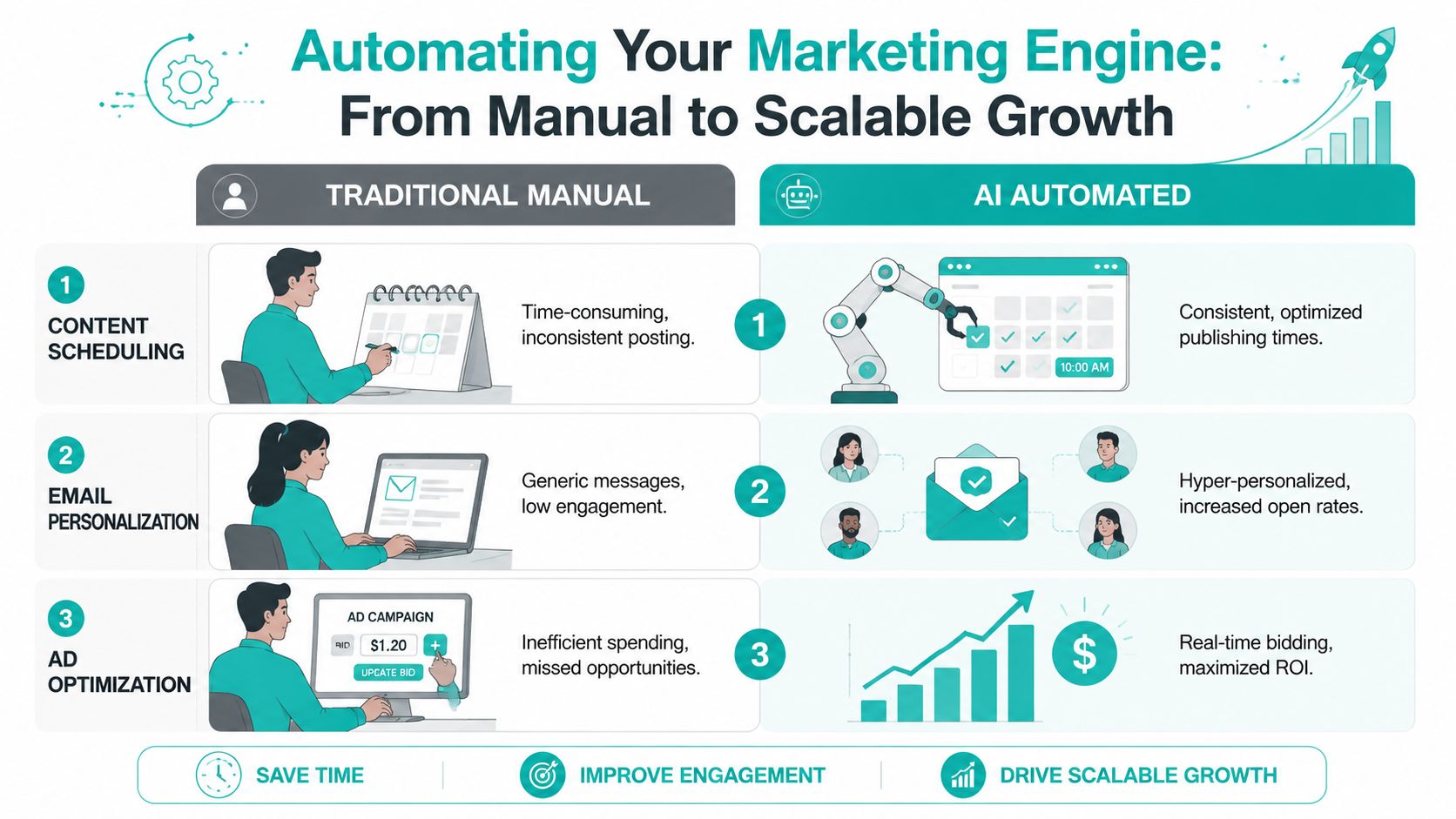
Once content drafting is under control, the next step is automation that runs without constant manual effort. At this stage, ai marketing for small business starts affecting lead flow, response time, and campaign efficiency.
Which automation comes first
Not every business should automate the same thing first. The right starting point depends on how customers buy from you.
| Business type | Best first automation | Why it usually comes first |
|---|---|---|
| E-commerce | AI-assisted ad optimization and email flows | Product sales depend on fast testing, remarketing, and cart recovery |
| Home services | Lead routing, chat intake, and follow-up sequences | Speed-to-lead often determines who wins the job |
| Healthcare and legal | Intake workflows and carefully reviewed nurture emails | Qualification and compliance matter more than volume alone |
| Professional services | CRM tagging and appointment follow-up | Long sales cycles need cleaner handoffs and better segmentation |
For e-commerce, platforms like Google Ads, Meta, Shopify apps, Klaviyo, and HubSpot often work well together when configured properly. For local service businesses, website chat, form routing, missed-call text-back, and review request sequences often produce faster wins than broad content automation alone.
Why lead scoring changes sales follow-up
One of the highest-value use cases in this phase is AI-driven lead scoring. It analyzes behavioral signals like website visit duration, email engagement, and purchase history to identify who is more likely to convert. Small businesses using this approach report a direct increase in conversion rates because sales teams focus on high-probability leads instead of guesswork, based on AI lead scoring and qualification guidance.
That matters because most small businesses don’t have a lead volume problem. They have a prioritization problem.
Consider two examples:
- A roofing company gets form fills from storm-related blog traffic, referral traffic, and paid search.
- A DTC retailer gets traffic from branded search, social retargeting, and email campaigns.
In both cases, the owner often treats every lead the same. AI scoring helps separate casual interest from buying intent. Someone who visited pricing pages, opened two emails, and returned to the site is not the same as someone who bounced after reading one blog post.
The fastest automation wins usually happen where response time and lead prioritization are weak.
A practical stack in this phase might include a chatbot for first-touch qualification, email sequences triggered by user behavior, and ad platforms using machine learning to adjust delivery. The key is orchestration. If tools don’t pass context to each other, you’re not automating a system. You’re creating isolated tasks.
For teams building those connected workflows, marketing workflow automation becomes the bridge between disconnected marketing actions and an actual lead-generation engine. One option in that category is Emulous Media, which implements automation across websites, marketing operations, and lead handling for businesses that need those systems aligned.
What tends not to work in days 31 through 60 is automating too broadly. A chatbot that answers everything poorly can hurt trust. An email flow with weak segmentation becomes noise. Smart implementation means choosing one or two workflows that directly support sales, then refining from there.
Days 61-90 Integrating and Analyzing for Growth
By this point, you should have useful AI outputs and at least a few automations running. The next challenge is integration. Without that, you’ll save time but still struggle to prove what’s working.
That gap shows up often. A 2026 analysis of 500 SMBs found that 35% abandon AI tools within 3 months because ROI remains unproven, often due to missing dashboards and attribution models that connect AI activity to revenue, according to SMB AI ROI findings.

Connect systems before buying more tools
A lot of businesses react to messy reporting by adding another platform. That usually makes the problem worse. What you need first is a clean flow of information between the systems you already use.
A practical setup might look like this:
- Website form or chatbot: captures inquiry details and source information
- CRM: logs lead status, sales notes, and pipeline progression
- Email platform: triggers nurture or reactivation campaigns
- Ad platforms: feed click and campaign data back into performance reporting
- Analytics dashboard: shows source-to-sale patterns, not just top-line traffic
If a prospect chats on your site, requests a quote, and later books after an email reminder, you need that journey connected. Otherwise, you’ll end up crediting the wrong channel or undervaluing the website experience that started the process.
Build dashboards that answer revenue questions
Most dashboards fail because they report activity instead of decisions. Small business owners don’t need another chart showing impressions. They need answers to questions like:
- Which channel generates qualified leads, not just form fills?
- Which landing pages attract buyers versus researchers?
- Which campaign themes drive calls, booked appointments, or completed checkouts?
- Which customer segments respond best to certain offers or timing?
That’s where AI-powered analysis becomes useful. It can detect patterns across source data, customer actions, and sales outcomes that are hard to catch manually. For an Orlando e-commerce brand, that might mean identifying which products tend to sell together and which campaigns attract higher-value buyers. For a local service business, it might mean noticing that certain ZIP codes or service categories produce more profitable jobs.
Better analytics doesn’t mean more reports. It means fewer blind spots between marketing spend and actual revenue.
This is also the stage where forecasting gets more practical. If your historical lead and sales data is structured properly, predictive tools can support decisions around inventory, staffing, promotion timing, and budget allocation. They’re not magic, and they still require human judgment, but they can improve planning if the inputs are clean.
Businesses that want to move from raw data to clearer decision-making often benefit from a framework built around AI-driven consumer insights. The value isn’t in having more information. It’s in identifying which behaviors signal revenue opportunity and acting on them faster.
Navigating AI Ethics Compliance and Data Privacy
A lot of AI marketing advice skips the uncomfortable part. The tools can save time and improve targeting, but they can also create legal and reputational problems if you deploy them carelessly.
That risk is already visible. A 2025 survey found that 62% of small businesses adopted AI marketing tools without privacy audits, and 28% then faced customer data breaches or regulatory fines averaging $15,000 per incident, according to small business AI privacy findings.

Where small businesses get exposed
The most common issues aren’t dramatic. They’re ordinary shortcuts that pile up:
- Uploading sensitive customer data into AI tools without checking how that data is stored or used
- Automating personalized messaging without understanding privacy obligations
- Publishing AI-generated claims in regulated industries without review
- Letting chatbots collect too much information before a human takes over
Healthcare, legal, financial, and professional service firms have less room for error here. If your business handles confidential details, intake forms, case information, or medical context, convenience cannot outrank compliance.
A safer starting point is anonymized testing. Use non-sensitive examples when building prompts. Limit what customer data enters third-party tools. Review how each vendor handles retention, permissions, and training inputs.
The human review process that actually works
The right answer isn’t to avoid AI. It’s to keep a human-in-the-loop process for anything customer-facing or sensitive.
That review process should include:
- Brand review so the language still sounds like your company
- Accuracy review so claims, offers, and descriptions are correct
- Compliance review for regulated messaging or sensitive data use
- Approval rules for what can be published automatically and what cannot
If an AI tool can publish directly to customers, someone on your team should define what requires human approval before that feature goes live.
This applies to emails, ad copy, chatbot scripts, website content, and even audience segmentation logic. Bias can show up in subtle ways. So can overpromising, vague disclaimers, or personalization that feels invasive rather than helpful.
For businesses formalizing those safeguards, a documented data protection policy helps define what data is collected, who reviews outputs, and how automated systems are governed. That discipline protects more than compliance. It protects trust, which is harder to rebuild than any campaign.
Your Next Steps to Partnering for Scalable Growth
A workable 90-day rollout is simpler than most business owners expect. First, use generative AI to speed up content and campaign production. Next, automate the workflows that directly affect lead handling, follow-up, and sales efficiency. Then integrate your systems so you can measure revenue impact instead of guessing.
What usually slows companies down isn’t access to tools. It’s sequence. They start with the wrong use case, connect nothing, skip governance, and end up with more noise than clarity. The better approach is to match the tool to the business model.
For example, a local service company usually gets more value from lead routing, chatbot intake, and nurture automation than from producing endless AI blog posts. An e-commerce brand often benefits sooner from product-focused ad optimization, segmentation, and lifecycle email flows. The highest ROI activities aren’t always the flashiest. They’re the ones closest to purchase behavior.
That matters because the upside is real when the foundation is right. When small businesses implement marketing automation correctly, they see an average return of $5.44 for every $1 invested, and 77% report higher conversion rates, based on marketing automation ROI data. Those results don’t come from turning on random software. They come from selecting the right workflows, building clean handoffs, and measuring outcomes carefully.
If you’re evaluating whether to build this internally or bring in outside help, look at the complexity objectively. Once websites, CRM systems, email platforms, paid media, analytics, compliance reviews, and creative production all intersect, execution matters as much as strategy. That’s where a structured partner can shorten the learning curve and avoid expensive missteps.
If you’re ready to map out the right AI marketing plan for your business, start with a focused conversation and request a proposal.
If your business needs a clearer path to AI adoption, Emulous Media Inc can help you turn scattered marketing activity into a connected growth system. Book a free consultation, call 689-255-6327, or visit the contact page to discuss your website, advertising, automation, and analytics strategy.