Using CRM for Marketing Automation: How Small Businesses Can Boost Lead Generation and Sales
CRM marketing automation pairs your customer database with rules and workflows so small teams capture, nurture, and convert leads without dropping the ball. This article breaks down how CRM integrations and automated sequences produce steadier lead flow, faster follow-up, and clearer revenue impact — with examples that fit project-based businesses like home renovation and remodeling firms. You’ll get a plain explanation of CRM marketing automation, how data and triggers move prospects through nurture journeys, how to pick the right CRM, ready-to-use automation templates, and the KPIs to track ROI. We include practical checklists, feature comparisons, workflow templates, and simple tables so you can map these tactics to your operations. Finally, we outline implementation options and how Emulous Media Inc.’s Take Back Your Marketing 6-Week Program helps teams build in-house skills and repeatable, profit-focused systems.
What Is CRM Marketing Automation and Why Does It Matter for Small Businesses?
CRM marketing automation means your CRM stores contact and job details, while automation runs rules that send messages, create tasks, and move deals through the pipeline. It works by capturing leads at touchpoints — website forms, calls, chats — applying scoring and tags, then launching workflows like welcome emails, sales reminders, or pipeline updates. For project-based small businesses this cuts lead leakage, shortens the time from estimate to follow-up, and raises conversion because every lead gets the right outreach at the right moment. Adoption data shows faster responses and cleaner scoring improve lead-to-customer conversion, provided your contact data is accurate and your rules are clear. Next, we’ll unpack how CRM records, triggers, and sales handoffs interact so you can design workflows that match your project lifecycle.
How Do CRM and Marketing Automation Work Together?
They form a feedback loop: capture, segment, automate outreach, then use sales activity to refine future targeting. CRM records hold details like project type, budget, and past interactions; the automation engine watches those fields and behavioral signals — form fills, page views, booking requests — to fire emails and create tasks. For example, a website estimate request can create a contact, apply a lead score, start a welcome email series, and create a task for an estimator; when the estimator updates the deal stage, the lead can move into a different nurture stream. This reduces manual handoffs and keeps context intact, which makes communications more relevant and shortens decision cycles for homeowners and other clients. Understanding that flow helps you build scorecards and templates that prioritize high-intent prospects.
What Are the Key Benefits of CRM Marketing Automation for Small Businesses?
CRM marketing automation delivers practical, revenue-focused gains: faster lead response, personalize-at-scale messaging, clearer tracking of marketing spend, and repeatable post-project nurture for upsells. Faster response happens when automations route inquiries and trigger immediate acknowledgements; personalization comes from segmentation and dynamic fields that tailor content to project type or stage. Measurement improves because automated activity feeds dashboards with source attribution and pipeline movement, letting teams calculate cost per lead and revenue per campaign. In remodeling businesses these benefits show up as higher estimate-show rates, improved follow-up after site visits, and a reliable way to re-engage past clients for maintenance or new projects — turning marketing into a more predictable part of the business.
Research shows lead generation and nurturing are central to profitability, but many businesses struggle to do them well.
Digital Lead Generation and Nurturing Strategies for Businesses
Lead generation and nurturing are core to company profitability, yet many organizations list them as top challenges. This study examines the role of marketing in lead generation and nurturing from marketing, information systems, and management perspectives. Twelve expert interviews informed the analysis. The findings show firms often invest in technology without enough focus on change management and the supporting processes and skills needed to run lead programs effectively. Without that holistic approach, companies are less able to execute lead generation and nurturing through the marketing function.
How Can Small Businesses Choose the Right CRM for Marketing Automation?

Picking the right CRM is about trade-offs: integrations, automation depth, ease of use, reporting, and price. Small teams should favor CRMs with native connectors for forms and calendars, drag-and-drop automation builders, a contact-and-project data model that supports job tagging, and dashboards that reveal pipeline velocity and campaign attribution. When you trial platforms, map your lead sources to CRM fields, plan a phased rollout to protect data quality, and include staff training so automations produce real results. The table below compares platform types that matter for remodelers and why each capability counts.
Introductory table comparing CRM features for remodelers:
| CRM Platform | Key Feature | Why it matters for remodelers |
|---|---|---|
| Contact-focused CRM | Contact & job tagging | Lets you link homeowners to specific projects and locations for better follow-up |
| Automation-first CRM | Drag-and-drop workflow builder | Enables small teams to build follow-ups and estimate sequences without coding |
| Integrations-oriented CRM | Native form & calendar connectors | Makes sure web leads and appointments land in the CRM reliably |
This comparison shows contact structure, ease of automation, and integrations determine how quickly a remodeling business can adopt CRM automation and begin seeing measurable results. Below is a short checklist you can use during vendor trials to evaluate fit.
When evaluating CRMs, use this checklist to score options during trials:
- Integration coverage: Does the CRM connect to website forms, email, calendar, and ad platforms?
- Automation capability: Can you build trigger-based workflows without developer help?
- Data model flexibility: Does it support project tags, multiple contacts per job, and custom fields?
Use these criteria to prioritize systems that lower implementation friction and speed time-to-value. The next section digs into feature priorities specifically for home renovation and remodeling businesses.
What Features Should Home Renovation and Remodeling Businesses Look for in a CRM?
Remodelers need a CRM that models projects, not just individual leads. Look for job tagging, estimate tracking, support for multiple contacts per job, and calendar integrations. Project records let you attach estimates, invoices, and timelines to one place so marketing, sales, and on-site teams share context. Configure pipeline stages to match your process — discovery, estimate sent, estimate discussed, contract signed — so automations can trigger the right follow-ups at each step. Calendar and reminder automations cut no-shows for site visits, and attachments let you store photos and scopes that improve repeat communications. Prioritizing these features reduces manual coordination and preserves project history that later fuels upsells and cross-sells.
How Do You Integrate CRM with Existing Marketing Tools Like Websites and Email?
Integrations use native connectors, APIs, or middleware to make sure form submissions, UTM data, and email interactions update contact records and trigger automations. Start by mapping website form fields to CRM attributes, capture UTM and source data for attribution, and set parsing rules for phone or chat leads. If native connectors aren’t available, middleware can relay events — a new form submission creates a contact, clicks update behavioral fields used for scoring. Test each path end-to-end with sample leads and verify automation triggers and pipeline updates, and set up manual fallbacks for edge cases. Reliable integration is the foundation for consistent lead capture and accurate campaign measurement.
Modern marketing campaigns are complex — automation helps you manage timing and sequencing so nothing falls through the cracks.
Automating Marketing Campaigns for Small Businesses
Marketing campaigns support how brands and products reach audiences. With more products, more segments, and faster change, campaign planning and administration have become more complex and time-pressured. Timing and sequencing are critical decision variables. This paper argues that using a process definition approach to describe marketing campaigns helps manage many competing campaigns through automation.
How Do You Automate Lead Nurturing and Customer Journeys Using CRM?
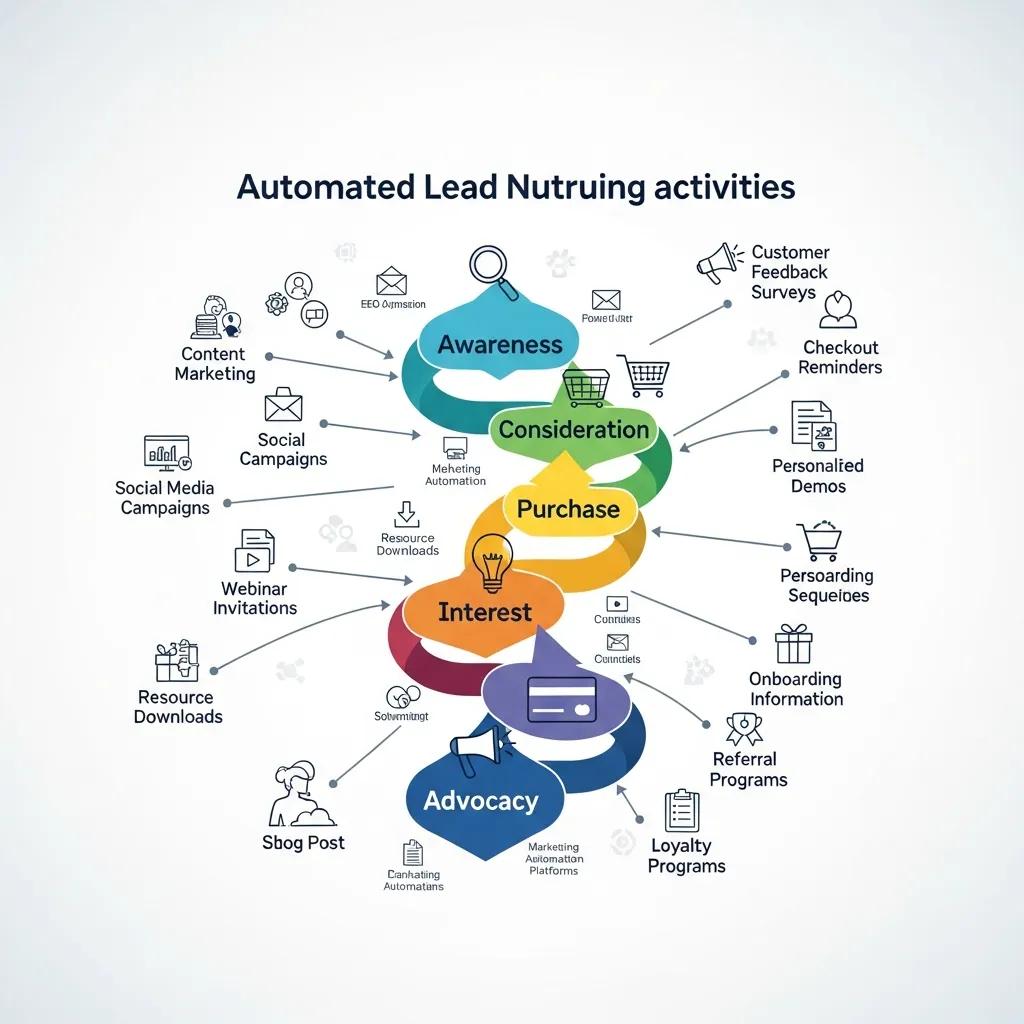
Automating nurture and customer journeys means building workflows that move prospects from awareness to estimate, decision, and post-project follow-up using triggers, segments, and timed sends. Use triggers like form submissions, lead-score thresholds, pipeline-stage changes, or appointment outcomes to start sequences that deliver relevant content — welcome messages, estimate reminders, financing guides, or testimonials — matched to the buyer’s stage. Automations should also create sales tasks when a lead hits a qualification threshold so personal outreach complements automated messaging. The table below offers practical workflow templates you can implement right away, with common triggers and intended outcomes tailored to remodelers.
| Workflow Name | Trigger | Outcome |
|---|---|---|
| New Lead Welcome | Website estimate form submit | Immediate acknowledgement email + scheduling prompt |
| Estimate Follow-Up | Estimate sent + 48 hours elapsed | Reminder email + sales rep task to call |
| Past Client Reactivation | Project closed > 9 months | Re-engagement email promoting maintenance services |
These templates show how triggers and outcomes keep momentum through decision points and reduce drop-off. The next section covers lead capture sources and simple scoring rules to help prioritize outreach.
What Are Effective Lead Capture and Scoring Automation Strategies?
Start by identifying high-value sources — website estimate requests, phone calls, paid ads, and referrals — then assign points to signals that indicate buying intent. A simple scoring model gives points for a sufficient budget, multiple page visits, or project-type fields, and moves leads above a threshold into a “hot” queue for immediate outreach. Always tag channel and campaign for attribution, and keep scoring rules transparent and easy to tweak based on conversion data. Automating score-based routing and alerts ensures high-intent prospects get fast attention while lower-scoring leads enter longer nurture streams, preserving sales bandwidth and improving conversion efficiency.
How Can Automated Email Sequences Personalize Customer Communications?
Email sequences use segmentation, dynamic fields, and conditional content to personalize at scale by project type, location, and stage. For example, a welcome series can include portfolio examples that match the contact’s project type, while conditional blocks show financing only when a budget threshold is present. Timing matters: immediate acknowledgement, a helpful follow-up within 24–48 hours, and a reminder before appointments keep prospects engaged without overwhelming them. Combine these sequences with behavioral triggers — for instance, sending a reminder if a lead revisits pricing — to increase relevance. When tied to pipeline outcomes, personalized sequences become measurable levers you can optimize.
How Do You Measure and Optimize the ROI of CRM Marketing Automation?
Measuring and optimizing ROI starts with clear KPIs, reliable data feeds, and regular test-and-learn cycles that use conversion and revenue data to improve outcomes. Track metrics like lead-to-customer conversion rate, cost per lead (CPL), cost per acquisition (CPA), time-to-conversion, and revenue per lead; these show funnel efficiency and channel value. Attribution depends on capturing source data at lead entry (UTMs, campaign tags) and linking closed deals back to campaigns. Set a reporting cadence — weekly checks for pipeline health, monthly reviews for cost and conversion trends — and use those insights to refine creative, scoring thresholds, and nurture timing. The table below maps each metric to its data source and a suggested benchmark for small businesses.
| Metric | Data Source | Target/Benchmark |
|---|---|---|
| Lead-to-customer conversion rate | CRM pipeline reports | 3–8% (varies by project size) |
| Cost per lead (CPL) | Advertising platform + CRM attribution | Benchmark vs. average job value |
| Time-to-conversion | CRM activity timestamps | Aim to reduce by 20% with faster follow-up |
With clear KPIs and clean data, teams can run focused experiments to see which automations move the needle and where to invest next. The following section explains how to use CRM data for upsells and cross-sells to lift lifetime value.
Using CRM and automation together is key to measuring marketing effectiveness and demonstrating ROI.
Measuring Marketing Effectiveness and ROI with CRM and Automation
The goal is to measure campaign effectiveness and return on investment using a combination of KPIs and automation platforms tied to CRM systems.
What Key Performance Indicators Track CRM Automation Success?
Core KPIs are conversion rate, CPL/CPA, pipeline velocity, and engagement metrics (email opens and clicks) tied to revenue. Conversion rate links automation directly to revenue; CPL and CPA show acquisition efficiency. Pipeline velocity — how quickly deals move between stages — reveals where automations speed things up or where bottlenecks remain. Engagement metrics tell you if content is resonating enough to drive action. Set baseline numbers, run A/B tests on messaging and timing, and use regular reviews to prioritize improvements that deliver the best ROI.
How Can CRM Data Be Used for Upselling and Cross-Selling Opportunities?
Use project history, tags, and lifecycle milestones to trigger timely, relevant offers. For example, after a kitchen remodel is complete, trigger a sequence with maintenance tips and a timed offer for seasonal upgrades or related services. Tags for materials, warranty dates, and project scope let you segment precisely so offers match customer needs. Automated reminders for seasonal services or warranty expirations re-engage past clients with minimal manual effort and raise lifetime value. Mapping these opportunities into workflows turns past projects into predictable revenue sources.
What Common Challenges Do Small Businesses Face with CRM Marketing Automation and How Can They Be Solved?
Small businesses often struggle with messy data, poor adoption, and integration gaps. Fix these with practical governance, simple workflows, and focused training that produce quick wins. Start with a short data-cleanup sprint and standardize field mappings. Improve adoption by building automations that reduce daily friction — templates, clear task lists for sales, and visible short-term wins help build confidence. For integration gaps, prefer native connectors and use middleware where needed; document edge cases and keep a manual fallback. These steps create momentum and prove automation’s value so teams will back further investment.
How to Overcome Integration and Adoption Barriers in Small Businesses?
Overcome barriers by finding quick wins, assigning clear ownership, and running targeted training that teaches real workflows rather than abstract features. Quick wins include an automatic lead acknowledgement email and a scheduling task for estimates — both show measurable improvements fast. Name a data steward and an automation owner, roll out changes in phases, and provide short training and simple documentation. Pilot automations with a small group, iterate, measure the impact, and then scale. These pragmatic steps reduce resistance and create a clear path for responsible growth.
What Future Trends, Including AI, Will Impact CRM Marketing Automation?
AI-driven personalization, predictive lead scoring, and tighter links between CRMs and customer data platforms (CDPs) will make targeting more accurate and decisioning more automated. AI can surface which leads are most likely to convert and personalize content based on inferred preferences, while CDPs create unified customer profiles for cross-channel orchestration. Small businesses can pilot predictive scoring or AI-assisted subject-line testing and measure lift before wider adoption. At the same time, privacy and data governance will matter more — balance experimentation with clear consent and transparent tracking to preserve customer trust.
How Does Emulous Media’s 6-Week Program Empower Small Businesses to Take Control of CRM Marketing Automation?
Emulous Media’s Take Back Your Marketing 6-Week Program teaches small teams to build measurable, profit-focused CRM automation and run it internally. The program emphasizes empowerment over ongoing agency dependence, delivering a practical playbook, hands-on training, and ready-made workflows teams can operate themselves. You’ll map customer journeys, set up automation templates, and build dashboards that show KPIs like conversion rate and CPL so you can optimize with data. If you want specialist support while building internal capability, the program includes options to hand over execution to staff trained during the engagement and to book strategy sessions that align outcomes with your business goals.
What Training and Playbook Does Emulous Media Provide for In-House Marketing Automation?
Emulous Media focuses on teaching clients to run marketing in-house using a concise playbook and role-based training covering workflow design, scoring rules, and measurement. The playbook turns automation principles into repeatable workflows and templates you can adapt to a remodeler’s project lifecycle. Training is practical and role-specific so staff know how to run automations and read dashboards. This approach reduces long-term dependency on vendors by equipping teams with the skills and documentation to run campaigns, adjust scoring, and keep data clean. Ownership ensures gains are sustainable and marketing becomes an internal strength, not an outsourced task.
How Have Home Renovation Businesses Increased Qualified Leads Using Emulous Media’s CRM Automation Strategies?
Remodelers who work with Emulous Media report clearer lead qualification and more consistent pipeline activity after applying the firm’s playbook. Aligning web capture with project-specific scoring and scheduling automations for estimate follow-ups increases qualified leads in the sales pipeline and reduces time-to-contact. Emulous Media emphasizes measurable systems and dashboards so businesses can track estimate-show rates and conversion from lead to contract. The program also offers strategy sessions to align expected outcomes with each business’s pricing and sales cycle. These practices help remodelers turn marketing into predictable opportunities with clearer ROI.
- Key implementation takeaways: Start with high-value capture points, implement simple scoring, automate immediate follow-ups.
- Operational advice: Train a data steward, document workflows, and measure outcomes weekly.
- Conversion focus: Tie automation directly to pipeline stages so improvements are visible and actionable.
These steps close the loop between marketing activity and measurable business outcomes and give small teams a practical roadmap to regain control of lead generation and conversion.
Frequently Asked Questions
What are the common pitfalls small businesses face when implementing CRM marketing automation?
Common pitfalls include messy data, limited staff training, and integration mismatches. These issues can make automations ineffective and waste resources. To avoid them, run an initial data-cleanup sprint, prioritize staff training on real workflows, and use native integrations where possible. Assign clear ownership for data and automation so someone is accountable for upkeep and troubleshooting.
How can small businesses ensure data quality in their CRM systems?
Keep data clean with regular audits, clear entry protocols, and validation rules to prevent errors. Train staff on why accurate data matters and give them easy-to-follow processes. Routinely remove duplicates and archive outdated records so segmentation and targeting remain reliable.
What role does customer feedback play in optimizing CRM marketing automation?
Customer feedback helps you tune messages, timing, and offers. Collect feedback after key interactions — estimates, completions, or service calls — and use it to refine workflows. That loop improves relevance and helps you spot friction points that automation alone might miss.
How can small businesses leverage CRM data for targeted marketing campaigns?
Segment customers by attributes like project type, purchase history, and engagement levels, and use those segments to send targeted campaigns. Automation delivers the right message to the right group at scale. Review past campaign performance in the CRM to refine future targeting and messaging.
What are the best practices for training staff on CRM marketing automation?
Train with hands-on, role-based sessions that mirror day-to-day tasks. Provide concise documentation, quick reference guides, and a mentorship setup where experienced users support new ones. Schedule refresh sessions for updates and encourage a culture of feedback to keep skills current.
How can small businesses measure the success of their CRM marketing automation efforts?
Track KPIs like conversion rates, acquisition costs, and engagement metrics tied to revenue. Use dashboards to visualize trends and run A/B tests on messaging and timing. Establish a regular review cadence to act on insights and iterate your automations.
**