You launched the site. You filled out the profile. You searched your business name, your service, your city, and Google gave you nothing useful back.
That’s maddening, especially when you know your business is real, active, and ready for customers.
If you’re asking why is my business not showing up on google, the problem usually isn’t mysterious. It’s almost always one of a handful of failures: your Google Business Profile isn’t verified, your listing is weak, your website is sending mixed signals, or Google has filtered you out. A helpful outside primer on Why is my business not showing up on Google? covers the broad issue well, but most business owners still need an actual diagnosis, not another generic checklist.
That’s where this gets practical. Your visibility problem usually starts with your profile, then moves into trust signals, then into technical cleanup. If your site itself has indexing issues, this breakdown on why your lovable site is invisible to Google and what to use instead is also worth reading before you start changing random settings.
Table of Contents
- Your Business Is Invisible on Google. Let's Find Out Why.
- Is Your Google Business Profile Verified or Suspended?
- Optimize Your Profile for Local Search Dominance
- Diagnosing Your Website's Technical SEO Problems
- Troubleshooting Advanced Google Visibility Issues
- Your Strategic Next Steps for Lasting Visibility
Your Business Is Invisible on Google. Let's Find Out Why.
When a business doesn’t show up on Google, owners usually make one mistake first. They assume the problem is “SEO” in the abstract.
It usually isn’t. It’s something more concrete and more fixable. Google can’t rank what it doesn’t trust, can’t trust what it can’t verify, and won’t promote a profile or website that looks incomplete, inconsistent, or low quality.
That’s why the smartest way to handle this is to diagnose in order, not guess. Start with the listing itself. Then look at how complete and credible it is. Then check whether your website confirms what your profile says. After that, you look for filters, soft suspensions, and quality issues that don’t show up in a simple dashboard.
Most businesses don’t have a visibility problem because Google is unfair. They have a visibility problem because their signals are weak, mixed, or incomplete.
For Central Florida businesses, this matters fast. If you’re in Lake Mary, Orlando, Sanford, Longwood, or anywhere nearby, local search isn’t a branding exercise. It’s how people decide who to call. If your profile is buried or missing, you’re handing demand to someone else.
Here’s the blunt truth. Google visibility is not one task. It’s a stack. Verification, optimization, website alignment, and ongoing trust signals all have to work together. Miss one layer, and the whole thing gets shaky.
Check the obvious first
Run this quick diagnostic before you touch anything:
- Search your exact business name: If you don’t appear for your own brand name, your problem is likely verification, suspension, or indexing.
- Search your main service plus city: If branded search works but service search doesn’t, your profile is probably weak or mismatched to search intent.
- Search from your phone in Maps: Desktop search can mislead you. Maps visibility often gives the most accurate picture.
- Compare your profile to competitors: If they have stronger categories, better photos, fresher reviews, and more complete service details, Google has a reason to rank them ahead of you.
Know what kind of invisibility you have
There’s a big difference between these situations:
| Situation | What it usually means |
|---|---|
| You don’t show up for your business name | Verification, suspension, duplicate listing, or indexing problem |
| You show up by name only | Optimization problem |
| You appear in some areas but not others | Distance, weak local landing pages, or service-area setup issue |
| You looked visible, then disappeared after edits | Reverification, review state, or quality filter |
That distinction matters because the fix changes completely depending on the symptom.
Is Your Google Business Profile Verified or Suspended?
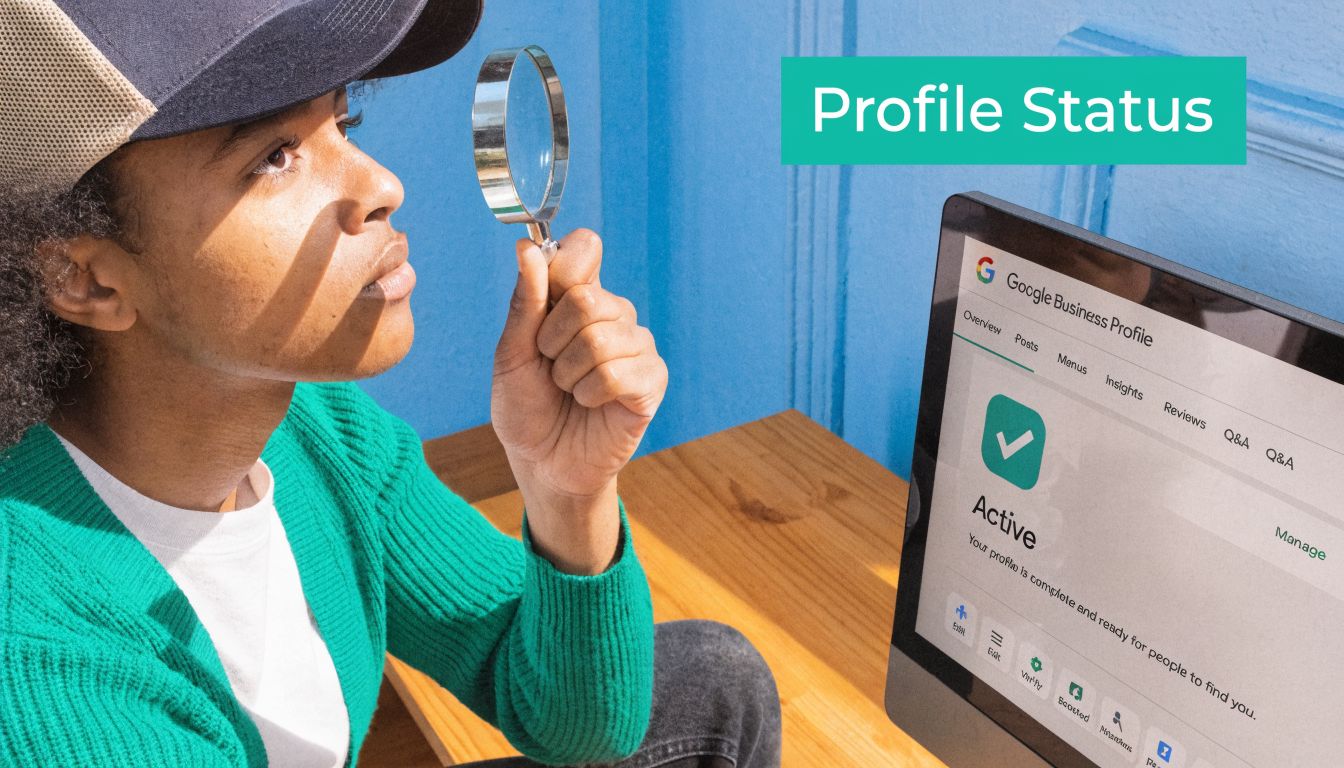
If your Google Business Profile isn’t properly verified, the rest of your local SEO work doesn’t matter much.
According to Chatmeter’s breakdown of missing Google business visibility, unclaimed or unverified Google Business Profiles are the leading cause preventing local businesses from appearing on Google, affecting an estimated 56% of small businesses. The same source notes that verified profiles appear 2.5x more often in “near me” queries, and 46% of all Google searches are local. That’s not a minor setup detail. That’s the front door.
Check the obvious first
Open your Google Business Profile dashboard and look for verification prompts, warnings, or restrictions. If you see “verify now,” you are not done. If you made major edits to your business name, address, phone number, or category recently, Google may have pushed you back into review.
Also check whether someone else already claimed your profile. That happens all the time with businesses that moved, rebranded, or had a listing auto-generated from directory data. If there’s an older version floating around, it can split trust and confuse Google.
A solid walk-through on how to set up your Google Business Profile is helpful if you need to confirm you didn’t miss a setup step.
Know the difference between unverified and suspended
Business owners often blur these together. They’re not the same.
Unverified means Google hasn’t confirmed you’re legitimate yet. Your profile may exist, but it won’t have full visibility or control.
Suspended means Google restricted your listing because something triggered a guideline or quality issue. Sometimes that’s obvious. Sometimes it isn’t.
There are two flavors of suspension that matter:
- Hard suspension: You’ll usually see a direct warning in the dashboard. The listing is effectively disabled.
- Soft suspension: The profile may look live to you, but the public can’t find it in search or Maps the way they should.
That second one wastes a lot of time because owners keep optimizing a profile that Google is filtering.
Practical rule: If you can see the profile in your dashboard but customers can’t reliably find it, stop assuming it’s a ranking issue. Treat it like a potential quality or suspension issue first.
Later, if you want to strengthen trust around your Google-facing presence overall, this page on Emulous Media’s Google Guaranteed badge gives useful context around legitimacy signals in local search.
What to do right now
Use this sequence:
Search your business name in Google and Maps
Do it while logged out or in an incognito window. If branded search is weak or absent, that’s a major warning sign.Check ownership and duplicates
Search your name, old address, old phone numbers, and past branding variations. One stale duplicate can create a mess.Review every recent edit
New category, keyword-heavy name change, service area changes, and address edits can all trigger reviews.
Before you start making more changes, watch this walkthrough. It’s a good reset if you’re not sure what the dashboard is telling you.
If your profile is suspended, don’t panic and don’t start guessing. Clean up anything that looks off. Remove stuffed keywords from the business name. Make sure the address reflects a legitimate business location. Then submit a reinstatement request with real documentation.
If your profile is only unverified, finish the process and wait. Verification is slow sometimes. That’s frustrating, but it’s still simpler than trying to rank a profile Google doesn’t fully trust.
Optimize Your Profile for Local Search Dominance
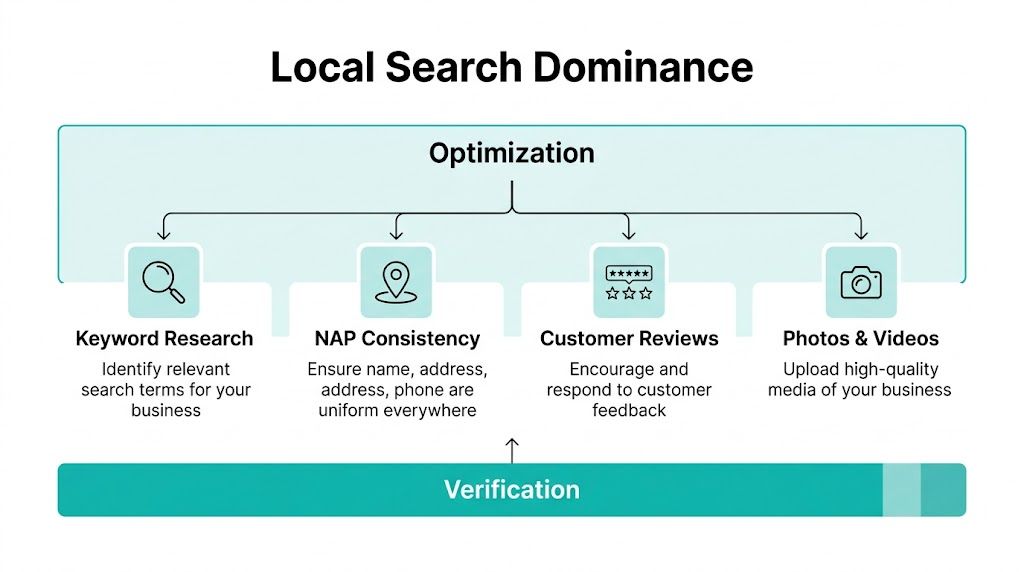
Verification gets you in the game. Optimization decides whether anyone sees you.
Google’s local ranking runs on relevance, distance, and prominence. According to Waterbear Marketing’s local ranking analysis, fully optimized profiles, which include precise categories, 20+ photos, and active review management, can see a visibility boost of up to 70% and are 42% more likely to get requests for directions. That lines up with what experienced local SEOs see every week. Thin profiles don’t compete well.
Relevance starts with categories and services
Your primary category tells Google what lane you belong in. If that’s wrong, the rest of the profile can be excellent and you’ll still struggle.
Often, a lot of businesses sabotage themselves. They choose a category that sounds broad or prestigious instead of one that matches how buyers search. Google doesn’t reward clever branding here. It rewards clarity.
For a Central Florida service business, ask a simple question: what would a customer type when they need help right now? Your category and service list should mirror that intent.
Use this checklist:
- Primary category first: Pick the closest exact match to your core service.
- Secondary categories carefully: Add only what you offer. Don’t stuff them.
- Services filled out completely: Don’t leave generic placeholders. Add actual service lines.
- Business description written for humans: Include your location, services, and differentiators in plain English.
Prominence comes from proof
Google trusts businesses that look active, reviewed, and real.
That means you need current reviews, consistent responses, real photos, and regular activity. If your profile has three blurry images, stale hours, and no recent engagement, Google has very little reason to feature it over a competitor who looks alive.
A better profile usually includes:
- Fresh photos: Team, exterior, interior, work samples, vehicles, products, before-and-after shots when relevant.
- Review responses: Every review deserves an answer. Not because it’s polite, but because it signals operational activity.
- Google Posts: Use them to show updates, offers, events, service highlights, or recent work.
- Q&A monitoring: Answer public questions before bad information sits there.
A profile that looks maintained earns more trust than one that looks abandoned, even if both businesses are legitimate.
If you want a practical benchmark for how profile work translates into local visibility, this page on local SEO results and proof is a useful reference.
Distance is real, but relevance still matters
You can’t fake proximity. If someone in Winter Park searches for a nearby service, Google will naturally favor businesses closer to them.
But business owners use distance as an excuse too often. Yes, it matters. No, it doesn’t explain everything. If you’re invisible even in your core service area, your profile is probably underbuilt or misaligned.
A simple comparison helps:
| Ranking pillar | What you can control |
|---|---|
| Relevance | Categories, services, description, content |
| Distance | Your verified location or valid service-area setup |
| Prominence | Reviews, photos, engagement, citations, brand authority |
If you’re wondering why is my business not showing up on google even after verification, this is usually the answer. Your profile exists, but it hasn’t earned confidence yet.
One tactical note. If you’re using AI to crank out generic posts or keyword-heavy descriptions, slow down. Google’s local systems have become less tolerant of low-quality, repetitive content. Keep the profile useful, specific, and human.
Diagnosing Your Website's Technical SEO Problems
A lot of local SEO advice treats your website like a side character. That’s a mistake.
Google compares your Google Business Profile against your website constantly. If the listing says one thing and the site says another, trust drops. If the site is thin, slow, or vague about your location and services, your profile has less support behind it.

According to All The Way Up Media’s analysis of local ranking failures, inconsistent NAP and missing LocalBusiness schema cause 50-70% of service businesses to vanish from Google Maps. The same source says implementing correct schema markup alone can signal relevance 2.5x more strongly and boost click-through rates by 30%. That’s not cosmetic. That’s foundational.
Your site and profile must match
NAP means name, address, and phone number. It needs to match across your website, your Google profile, and your major directories.
Not “close enough.” Match.
If your footer says one phone number, your contact page shows another, and Yelp has an older address, you’re creating unnecessary doubt. Google can work with messy data to a point, but in competitive local markets, inconsistent business info drags performance down fast.
Start with these pages:
- Homepage
- Contact page
- Footer
- Location pages
- Schema markup
- Directory listings
Then compare those details against your GBP line by line.
Schema tells Google what your business is
Most business owners never touch schema because it sounds technical. It is technical. It’s also worth doing.
LocalBusiness schema gives Google structured information about who you are, where you are, what you do, and what area you serve. Without it, Google has to infer more from page content and scattered citations. With it, your site becomes much easier to classify correctly.
At minimum, your schema should reflect:
- Business name
- Address and phone
- Business type
- Hours
- Website
- Service area where applicable
If your website reads clearly to a person but not cleanly to a machine, schema closes that gap.
For businesses that depend on local discovery, technical cleanup like this belongs on the same priority level as profile optimization. If you’re evaluating site performance more broadly, this guide to website speed optimization is a practical next step.
Speed and mobile UX still decide trust
This part gets ignored because it’s less visible than reviews or categories.
But if your site loads poorly on mobile, buries contact info, or makes users pinch and zoom to figure out what you do, Google picks up on that weak experience. Local SEO is not isolated from UX. The profile gets people curious. The website confirms whether they should trust you.
Use a quick technical audit to spot common failures:
| Technical issue | Why it hurts visibility |
|---|---|
| Slow mobile load times | Users bounce before engaging |
| Missing location pages | Weak local relevance signals |
| Broken internal links | Poor crawlability and weak user flow |
| Thin service pages | Low topical clarity |
| No embedded map or location cues | Weak connection to local entity data |
One practical note from the field. Many businesses in Central Florida run into this after redesigning a site. The new design looks cleaner, but the local signals disappear. Footer NAP gets shortened, location pages get merged, schema is removed, and rankings slide. Pretty websites don’t automatically help local search. Structured, location-aware websites do.
Troubleshooting Advanced Google Visibility Issues
Some businesses do the basics right and still stay invisible. That’s where most online advice falls apart.
If your profile is verified, your categories make sense, your website is aligned, and you still can’t gain traction, you may be dealing with a filter rather than a setup problem.

Google’s own support documentation has been tied to commentary around recent visibility issues, and the verified data here states that recent Google algorithm shifts in late 2025 integrating the Helpful Content Update into local search have led to a 22% increase in suspensions for “spammy attributes”. It also notes that many of these are soft suspensions where the profile appears live to the owner but is invisible in public search results. See Google Business Profile support information.
Soft suspensions are real
A soft suspension is one of the most annoying problems in local search because nothing looks obviously broken.
You log in. The profile is there. No dramatic warning. Maybe you can even edit posts and update photos. But branded searches are weak, category searches don’t trigger visibility, and competitors with worse-looking profiles outrank you.
That usually means Google has concerns about trust or quality.
Common triggers include:
- Aggressive edits in a short period
- Keyword stuffing in the business name or description
- Duplicate listings
- Questionable address setup
- Low-quality AI-generated profile content
- Mismatch between site, citations, and GBP details
Over-optimization can get you filtered
A lot of business owners hear “optimize your profile” and interpret that as “add more keywords everywhere.”
Bad move.
Google wants useful business information, not clumsy SEO copy pasted into every field. If your updates read like they were written for a robot, or your business name suddenly includes every service and city you want to rank for, you’re increasing risk instead of visibility.
“Human, specific, and believable” beats “keyword-rich” when Google is deciding whether to trust a local profile.
If you’ve recently loaded your profile with AI-generated posts, generic FAQ answers, or repetitive service blurbs, pull back. Rewrite them in your actual voice. Add real photos. Describe real work. Mention real service contexts instead of chasing every phrase you can think of.
Build trust signals that survive updates
The businesses that hold visibility through algorithm changes usually share a few traits:
- Consistent business information everywhere
- Real reviews from real customers
- Legitimate local citations
- Website content that reflects actual expertise
- Regular but measured profile activity
- No spam tactics trying to outsmart the system
That’s also where experienced execution matters. Tools can find symptoms. They don’t always diagnose the cause. A profile can look fine on the surface and still be filtered because its edits, content patterns, or supporting signals don’t pass the smell test.
One option some business owners use at this stage is a professional local SEO service that combines profile work, website cleanup, content, and citation management in one process. Emulous Media Inc offers that kind of support as part of its broader digital marketing and web strategy work, especially for service businesses that need local lead generation tied directly to site performance and conversion.
Your Strategic Next Steps for Lasting Visibility
If you’ve made it this far, you probably already know the main lesson. Showing up on Google isn’t one switch.
It’s a chain. If one link is weak, visibility suffers.
Fix the highest-impact issues first
Don’t start with blogs, backlinks, or fancy SEO tools if your core business data is shaky. Work in this order:
- Verify or recover the Google Business Profile
- Remove duplicates and resolve suspension issues
- Tighten categories, services, photos, and reviews
- Match your website NAP and add LocalBusiness schema
- Improve mobile speed and location relevance
- Audit for soft-suspension signals and low-quality content
That sequence saves time because it matches the way Google evaluates local businesses. Basic trust first. Then relevance. Then authority.
Treat visibility like an operating system
A lot of business owners still treat local SEO like a setup project. It isn’t.
Your profile needs maintenance. Your site needs technical attention. Reviews need responses. New photos matter. Content quality matters. Directory data drifts over time. Google changes how it filters weak or suspicious signals. If nobody is actively managing that, decline is predictable.
For Central Florida businesses that don’t have time to babysit this every week, the better move is usually structured management instead of occasional cleanup. If you want to see what that looks like in practice, take a look at local SEO services in Lake Mary.
The blunt version is this. If you’re still asking why is my business not showing up on google, stop guessing and start auditing in order. Fix what’s broken first. Strengthen what’s weak second. Then maintain the system so you don’t disappear again.
If you want help diagnosing why your business isn’t showing up and fixing the root cause instead of chasing random SEO tips, contact Emulous Media Inc. You can book a free consultation, call 689-255-6327, or visit the contact page and get a real visibility plan for your business.
Drafted with Outrank app